Disclosure up front. We make PicDock, an Android app that turns a tablet into a photo frame, and it has a pet filter — so we are not neutral. To keep this fair, every detail about other products comes from their own help pages, websites or Google Play listings, checked on October 17, 2026, with a link next to each fact. Every PicDock detail comes from our public fact sheet. PicDock is listed on Google Play as "Photo Slideshow, Digital Frame" by DD_studio. There is a section on what PicDock's pet filter cannot do, and on where Google Photos and Aura do this better.
A camera roll with a dog in it is mostly dog. But it also holds receipts, screenshots and twenty photos of a birthday cake, and nobody wants those on the kitchen shelf. So people search for a frame that shows only the dog. Before choosing a tool, it helps to know that there are two quite different features hiding behind that wish.
Short answer:
- One pet in the family, or any of your pets is fine → a pet filter is enough. It keeps photos that contain a dog or cat and skips the rest.
- Several dogs, and the frame should show one of them → you need individual recognition. Google Photos can group photos of the same pet and fill a live album with them; a frame that syncs that album shows only that pet. See recognising your own dog.
- You do not want any automatic analysis → keep the pet's photos in one album or folder and point the frame at it. No filter needed.
“Is there a pet?” vs. “Is this my dog?”
A pet filter looks at each photo and asks a yes/no question: is there a dog or a cat in it? It works without knowing anything about your animals, so there is nothing to set up, and it is right far more often than it is wrong. But it treats your dog, the neighbour's dog and a dog in the background of a park photo the same way.
Individual recognition is a different job: the software groups photos in which the same animal appears, the way face grouping works for people, and you label the group. That is what “only Max, not Bella” needs. It also means the tool builds a model of your pet from your library, which is worth knowing about if you care where that happens.
Recognising your own dog: Google Photos (and Aura)
Google Photos does the individual kind. Its help page “Set up & manage your face groups” (checked October 17, 2026) says you can “apply a label to people or pets that appear in photos grouped by Google Photos”, and that pets are part of Face Groups unless you turn off “Show pets with people”. The same page notes that the feature “isn’t available in all geographic regions, all domains, or all account types”.
Google's “Create & edit photo albums” page describes live albums: you choose people and pets, and matching photos are added to the album automatically. Google adds two caveats there: “Live albums are not available in all countries”, and “Face Groups isn’t perfect. Photos that don’t have any of the selected people may occasionally be added.”
To put that album on a frame, the frame has to follow the album as it grows. Aura says on its Google Photos page that you can “sync an entire Google Photos album to automatically update Aura frames as new photos are added”. So a Google Photos live album of one pet, synced to an Aura frame, gives a frame that shows that pet and keeps up with new photos. For “only this one dog”, that is the more complete route today — and it is not what PicDock does (see below).
What the popular frame apps say about pets
We checked the Google Play listings of the apps people most often compare (US English, October 17, 2026). None of the three listings mentions a pet filter:
- Fotoo - Photo Frame Slideshow (Bopp Studio): sources include Google Photos, Dropbox, Google Drive, OneDrive and Samba/SMB; weather, time, background music and screensaver are listed. A pet or face filter is not stated. 3.8 stars (6,746 ratings), 1M+ downloads, updated Sep 21, 2026.
- Frameo: the companion app for Frameo Wi-Fi frames; it sends photos from phones to the frame. A pet filter is not stated. 4.8 stars (147,833 ratings), 5M+ downloads, updated Oct 12, 2026.
- Aura Frames: a pet filter is not stated on the listing itself; the individual-pet route above runs through Google Photos. 4.8 stars (30,115 ratings), 1M+ downloads, updated Oct 16, 2026.
“Not stated” means the listing does not mention it, not that the feature cannot exist. If it matters, ask the developer.
How PicDock's pet filter works
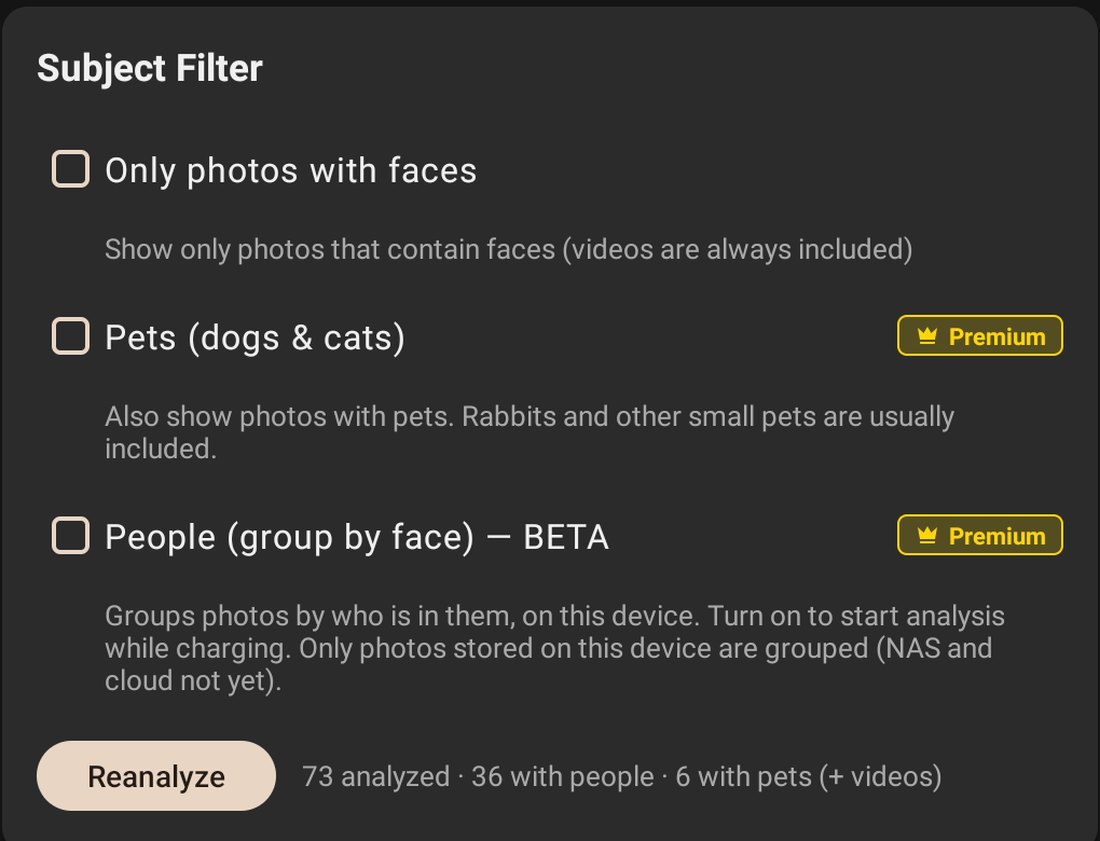
From our fact sheet, precisely:
- It is a yes/no filter. It shows only photos that contain a pet — dogs, cats or both. Rabbits and other small pets are usually included.
- It does not recognise individual animals. It cannot tell your dog from another dog. In a home with one dog, “photos with a dog” is usually the same thing as “photos of our dog”; with two dogs, it is not.
- It runs on the device. The image-labelling model is bundled in the app, and photos are not uploaded for this analysis.
- It is part of Premium. The slideshow and every photo source except web upload are free; the pet filter is one of the Premium features.
PicDock also has a face filter (“only photos with people”) and automatic person grouping. How those work, and why it matters where the analysis runs, is in photo frames that show only certain people.
The no-filter way: an album or a folder
Filters are a shortcut. If you already have, or are willing to make, an album of your pet, any frame app can show only that. In PicDock, a chosen album on the device, or a Dropbox or OneDrive folder, can be the photo source — both are free. A cloud folder is refreshed automatically, so when someone in the family drops a new photo of the dog into it, the frame picks it up without touching the tablet. This is also the way to show one particular dog among several: the album decides, not a model.
Setup guides: Dropbox folder · OneDrive folder · turn an old tablet into a frame.
Side by side
| PicDock pet filter | Google Photos live album (+ a frame that syncs it) | Album or folder you curate | |
|---|---|---|---|
| Shows only pet photos | Yes (dogs, cats or both) | Yes | Yes |
| Tells one dog from another | No | Yes (Face Groups; “isn’t perfect”, per Google) | Yes — you choose the photos |
| Where the analysis runs | On the device | In Google Photos | No analysis |
| New photos added automatically | From the selected source | Yes, to the live album; Aura syncs albums | Only if you add them to the album or folder |
| Availability limits | Premium; Android app | Not in all countries or account types (Google) | None |
Sources: PicDock facts; Google Photos Help face groups and albums; Aura. All checked October 17, 2026.
What PicDock does not do
- No individual pet recognition. It cannot pick out your dog. Use an album or folder for that.
- Google Photos is a picker, not a live album. You pick photos and they are saved on the device; PicDock does not follow a Google Photos live album as it grows. Aura does this better.
- No Google Drive. Google Drive is not a supported photo source.
- No video from cloud sources. Videos play from device storage and, as an opt-in beta, from a NAS / SMB share; videos in Google Photos, Dropbox, OneDrive or iCloud Shared Albums are not played.
- This is about the Android app. Cloud and NAS sources are Android-only; PicDock's separate iPhone and iPad app shows the photo library on the device.
What it costs
PicDock on Google Play is free to download, and every photo source except web upload is free, with no time limit; new installs get a 7-day trial of all features, the pet filter included. Optional Premium (the pet filter, person grouping, more transitions, forecasts and more) is available as a lifetime purchase (US$19.99), or a yearly or monthly subscription — prices are shown in the app and vary by country. The Amazon Appstore version for Fire tablets is a US$4.99 paid app. Full details: PicDock facts page.
FAQ
Can a digital photo frame show only my dog's photos?
Yes, in two different ways. A pet filter shows only photos that contain a pet, which works well with one pet in the family. To show one particular dog, you need individual recognition: Google Photos can group photos of the same pet into a live album (not in all countries), and a frame that syncs albums, such as Aura, shows it. Or keep the dog's photos in one album or folder and point the frame at it.
Does PicDock recognise my dog?
No. Its pet filter detects whether a pet is in a photo — dogs, cats or both — and does not recognise individual animals. For one dog among several, use an album or folder of that dog as the source.
Is PicDock's pet filter free, and are photos uploaded?
The pet filter is part of Premium (lifetime, yearly or monthly); every photo source except web upload is free. The model is bundled in the app and runs on the device; photos are not uploaded for this analysis.
Can I make a pet-only frame without paying for anything?
Yes. Put your pet's photos in one album on the tablet, or in a Dropbox or OneDrive folder, and choose it as the source. Albums and cloud folders are free sources, and cloud folders refresh automatically.
In short
Decide which question you are asking. “Only photos with our dog in them” is a pet filter, and with one dog it is usually all you need. “Only Max” is individual recognition, which Google Photos does today and an album-syncing frame can follow. And an album you curate yourself does both jobs without any model at all. Related: photo frames that show only certain people · a photo frame gift for parents.
Get PicDock on Google Play · PicDock facts · People filter and privacy · Old tablet as a frame