Disclosure up front. We make PicDock, the Android app this guide is built around, so we are not neutral. PicDock details come from our facts page and were checked against the app's source code in October 2026. Facts about Fravora and Fotoo come only from their US Google Play listings, fetched on October 21, 2026, and we say where they do better.
Families rarely keep every photo in one place. One parent's phone backs up to Google Photos, the other's Windows laptop fills OneDrive, a grandparent scanned old prints onto a NAS. A frame app that reads only one of those leaves most of the family out.
Short answer: yes, an Android tablet can show Google Photos and OneDrive in one slideshow. In PicDock you add one source, then add the next with Add to current slideshow, and the photos are shuffled together. One honest catch: because of Google's 2025 API change, the Google Photos part is a set you pick by hand and does not grow by itself, while the OneDrive part follows its folder automatically.
Why mixing Google Photos with other sources is the hard part
OneDrive, Dropbox and NAS shares let a frame app re-read a folder whenever it likes. Google Photos no longer does. Google's API updates page says the library read scopes were removed on March 31, 2025; ordinary apps now receive only the items you select in Google's picker. Continuous album access through the Ambient API is for frame makers accepted into Google's partner program. So any "Google Photos plus OneDrive" frame is really two different kinds of source living side by side. Our Google Photos frame guide explains the change in detail.
What PicDock can put in one slideshow
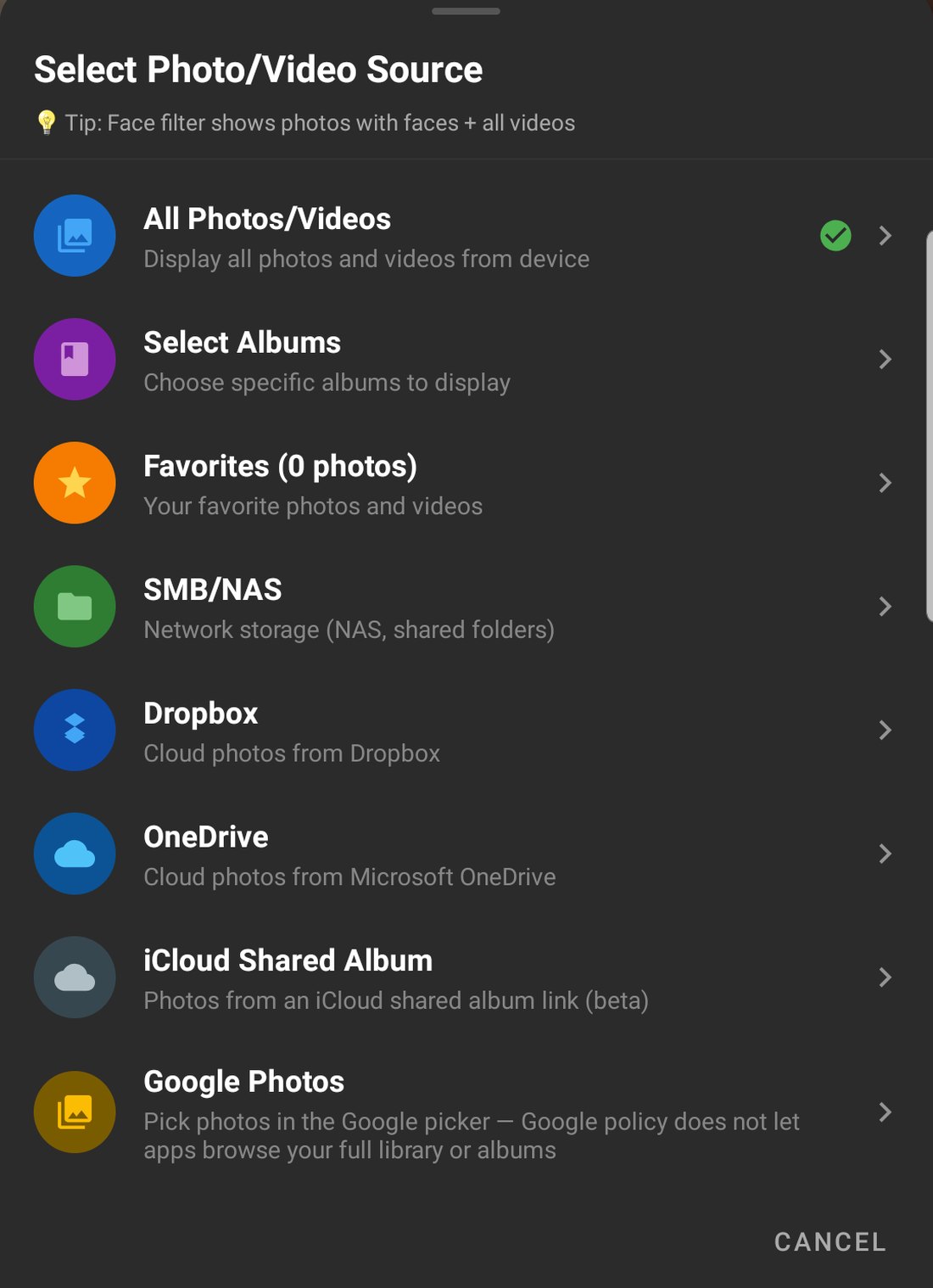
The combined source can include any mix of these (Android app, Google Play version):
| Source | How you add it | New photos appear by themselves? | Videos |
|---|---|---|---|
| Photos on the device | All photos, chosen albums or favorites | Yes | Yes |
| Google Photos | Pick photos in Google's picker; PicDock saves them on the tablet | No, pick again to add newer ones | No |
| OneDrive | Sign in, tick one or more folders | Yes, re-read at intervals | No |
| Dropbox | Sign in, tick one or more folders | Yes, re-read at intervals | No |
| iCloud shared album | Paste the album's public link | Yes, re-read at intervals | No |
| NAS / SMB share | Host, share and account | Yes, re-read at intervals | Opt-in beta |
Photos from all the parts are shuffled into one list. A combined source is re-read on the schedule of its most frequently refreshed part, and it also checks when you come back to the app.
Setup: Google Photos plus OneDrive in PicDock
You need an Android tablet or phone (Android 7.0 or later) and PicDock from Google Play (store name: "Photo Slideshow, Digital Frame", developer DD_studio). It is not the macOS utility picdock.app.
- Start with OneDrive. Media Source → OneDrive, sign in with a personal Microsoft account, tick the folder you keep for the frame. Details: OneDrive folder guide.
- Add Google Photos. Media Source → Google Photos → Add photos, pick photos (you can open an album and select from it), return to PicDock, then tap Play all saved photos.
- PicDock asks: "Replace the current slideshow with this selection, or add it to the slideshow?" Choose Add to current slideshow.
- Repeat for Dropbox, a NAS share, an iCloud shared album or device albums if you like. The order does not matter.
- To pause or remove one part later, open Manage combined sources in the photo source settings: uncheck a source to pause it, tap the trash icon to remove it.
If one part cannot be reached when the slideshow loads (a NAS asleep, Wi-Fi not ready yet), PicDock shows the photos from the rest and tells you how many sources failed. During later refreshes, a failed part does not empty the frame: PicDock keeps the current list until every part answers again.
Fravora and Fotoo: what their listings say
Only facts stated on each app's US Google Play listing on October 21, 2026. We have not tested Fravora or Fotoo.
| PicDock | Fravora | Fotoo | |
|---|---|---|---|
| Google Play title / developer | Photo Slideshow, Digital Frame / DD_studio | Fravora: Digital Photo Frame / aniujual software | Fotoo - Photo Frame Slideshow / Bopp Studio |
| Sources named | Device, Google Photos, Dropbox, OneDrive, iCloud shared albums, NAS/SMB, web upload (Premium) | Local folders, SMB/NAS (Synology, QNAP), Google Photos, Microsoft OneDrive, Dropbox, Immich | Local gallery, Google Photos, Dropbox, Google Drive, Microsoft OneDrive, Samba/SMB |
| Several sources in one slideshow | Yes (combined source) | Yes: "in one seamless slideshow" | Not stated |
| How Google Photos is read | Google Photos picker, photos saved on the tablet | Not stated | Release notes: "New Google Photos Ambient support" |
| Weather and clock | Yes | Yes | Yes |
| Other extras mentioned | Dual mode, background music, screensaver, face filter (pet filter in Premium) | Internet radio, voice control, anti-burn-in micro-shifts, running-hours schedule | Background music, screensaver, scheduled auto-play, face-aware Focus effect |
| Paid options shown | In-app purchases, US$0.99–19.99 per item | In-app purchase, US$5.99 per item | In-app purchases, US$24.99–39.99 per item |
| Ads label on the listing | None shown* | Contains ads (one optional rewarded ad, per its description) | None shown |
| Downloads | 10K+ | 100+ | 1M+ |
| Rating | 4.4 (170 ratings) | No rating shown | 3.8 (6.75K reviews) |
| Listing updated | Oct 16, 2026 | Aug 21, 2026 | Sep 21, 2026 |
* PicDock never shows ads on the slideshow itself; in the free Google Play version a banner can appear in settings screens, and an optional rewarded ad can unlock Premium temporarily (facts page).
Sources, fetched 2026-10-21 (US English): PicDock, Fravora, Fotoo. Prices and ratings vary by country and change over time.
Where Fravora does better
- It says outright that it mixes sources: "Display photos from local folders, SMB/NAS network shares, and cloud storage in one seamless slideshow."
- Immich, the self-hosted photo server, is on its source list. PicDock does not support Immich.
- Built-in internet radio and voice control ("on-device wake-phrase detection"), plus "Anti-burn-in micro-shifts" for 24/7 screens.
- Its listing describes the paid upgrade as not being a subscription and shows a single US$5.99 in-app item. It is also a young app: 100+ downloads, first released May 29, 2026, with no rating shown yet.
Where Fotoo does better
- Google Drive, which PicDock does not support.
- Google Photos Ambient support, per its latest release notes ("existing users must reconnect and select photos again"). Ambient is Google's partner API for frames, so if a Google Photos selection that keeps itself current is your priority, Fotoo is worth a look. Its listing does not say whether Google Photos and OneDrive can play in the same slideshow.
- Track record: 1M+ downloads, released May 12, 2014.
Where PicDock fits: you want Google Photos and OneDrive (or Dropbox, a NAS, an iCloud shared album) in the same slideshow, with a clock, weather, night dimming and auto-start on the charger, and all photo sources except web upload free.
What PicDock does not do
- The Google Photos part does not update by itself. New photos in a Google Photos album appear only after you pick them. For a frame family members fill without touching it, keep those photos in a OneDrive or Dropbox folder.
- No Google Drive support.
- No playback of videos stored in the cloud. Google Photos, OneDrive and Dropbox show photos only; videos play from the device and, as an opt-in beta, from a NAS.
- The Android screensaver shows device photos only. A combined source plays in the app's full-screen slideshow.
- Cloud and NAS sources are Android only. PicDock for iPhone and iPad (iOS 15 or later) is a separate app that uses the device's Photos library, including iCloud shared albums you have joined, chosen as albums. It has no Google Photos, OneDrive, Dropbox or NAS source.
What it costs
The Google Play version is free to download and use: all photo sources except web upload are free, combining them is free, and Premium is optional, as a lifetime purchase (US$19.99 in the US), a yearly or a monthly subscription; your country's price is shown in the app. New installs get a 7-day trial of all features. The Amazon Appstore version for Fire tablets is a paid app (US$4.99). Details on the facts page.
FAQ
Is there a photo frame app that shows Google Photos and OneDrive together?
Yes. On Android, PicDock combines Google Photos (picked photos), OneDrive and Dropbox folders, iCloud shared albums, NAS shares and device photos in one slideshow. Fravora's listing also says it mixes local, NAS and cloud photos, including Google Photos and OneDrive. Fotoo's listing names both services but does not say whether they can be mixed.
Will new Google Photos and new OneDrive photos appear on the frame by themselves?
In PicDock, new OneDrive, Dropbox, iCloud shared album and NAS photos do; new Google Photos do not, because ordinary apps can only receive photos you pick. Pick again to add them. Fotoo's latest release notes mention Google Photos Ambient support, Google's partner API for frames.
Is mixing sources free in PicDock?
Yes. All photo sources except web upload are free in the Google Play version, and so is combining them. Premium is optional: lifetime (US$19.99 in the US), yearly or monthly. The Amazon version is a paid app (US$4.99).
Can the iPhone or iPad version of PicDock mix Google Photos and OneDrive?
No. Cloud and NAS sources are Android only. The iOS app uses the device's Photos library, including iCloud shared albums you have joined.
In short
One Android tablet can show Google Photos and OneDrive together. In PicDock, add the second source with Add to current slideshow. Expect the OneDrive folder to keep itself current and the Google Photos part to stay as you picked it. If you need Google Drive or Google's partner-level Google Photos access, look at Fotoo; if you need Immich, radio or voice control, look at Fravora. Related: Google Photos on an Android tablet frame · OneDrive folder frame · Dropbox folder frame · NAS frame apps compared.